
 Klosszhu
bdd3dcadb6
1
Klosszhu
bdd3dcadb6
1
|
2 gadi atpakaļ | |
|---|---|---|
| .. | ||
| lib | 2 gadi atpakaļ | |
| .signature.p7s | 2 gadi atpakaļ | |
| Azure.Identity.1.6.0.nupkg | 2 gadi atpakaļ | |
| CHANGELOG.md | 2 gadi atpakaļ | |
| README.md | 2 gadi atpakaļ | |
| azureicon.png | 2 gadi atpakaļ | |

README.md
Azure Identity client library for .NET
The Azure Identity library provides Azure Active Directory token authentication support across the Azure SDK. It provides a set of TokenCredential implementations which can be used to construct Azure SDK clients which support AAD token authentication.
Source code | Package (nuget) | API reference documentation | Azure Active Directory documentation
Getting started
Install the package
Install the Azure Identity client library for .NET with NuGet:
Install-Package Azure.Identity
Prerequisites
- An Azure subscription.
- The Azure CLI can also be useful for authenticating in a development environment, creating accounts, and managing account roles.
Authenticate the client
When debugging and executing code locally it is typical for a developer to use their own account for authenticating calls to Azure services. There are several developer tools which can be used to perform this authentication in your development environment.
Authenticating via Visual Studio
Developers using Visual Studio 2017 or later can authenticate an Azure Active Directory account through the IDE. Applications using the DefaultAzureCredential or the VisualStudioCredential can then use this account to authenticate calls in their application when running locally.
To authenticate in Visual Studio select the Tools > Options menu to launch the Options dialog. Then navigate to the Azure Service Authentication options to sign in with your Azure Active Directory account.

Authenticating via Visual Studio Code
Developers using Visual Studio Code can use the Azure Account extension to authenticate via the editor. Applications using the DefaultAzureCredential or the VisualStudioCodeCredential can then use this account to authenticate calls in their application when running locally.
To authenticate in Visual Studio Code, ensure version 0.9.11 or earlier of the Azure Account extension is installed. To track progress toward supporting newer extension versions, see this GitHub issue. Once installed, open the Command Palette and run the Azure: Sign In command.
Authenticating via the Azure CLI
Developers coding outside of an IDE can also use the Azure CLI to authenticate. Applications using the DefaultAzureCredential or the AzureCliCredential can then use this account to authenticate calls in their application when running locally.
To authenticate with the Azure CLI, users can run the command az login. For users running on a system with a default web browser the azure cli will launch the browser to authenticate the user.

For systems without a default web browser, the az login command will use the device code authentication flow. The user can also force the Azure CLI to use the device code flow rather than launching a browser by specifying the --use-device-code argument.

Authenticating via Azure PowerShell
Developers coding outside of an IDE can also use Azure PowerShell to authenticate. Applications using the DefaultAzureCredential or the AzurePowerShellCredential can then use this account to authenticate calls in their application when running locally.
To authenticate with Azure PowerShell, users can run the command Connect-AzAccount. For users running on a system with a default web browser and version 5.0.0 or later of azure PowerShell, it will launch the browser to authenticate the user.
For systems without a default web browser, the Connect-AzAccount command will use the device code authentication flow. The user can also force Azure PowerShell to use the device code flow rather than launching a browser by specifying the UseDeviceAuthentication argument.
Key concepts
Credentials
A credential is a class which contains or can obtain the data needed for a service client to authenticate requests. Service clients across Azure SDK accept credentials when they are constructed, and service clients use those credentials to authenticate requests to the service.
The Azure Identity library focuses on OAuth authentication with Azure Active directory, and it offers a variety of credential classes capable of acquiring an AAD token to authenticate service requests. All of the credential classes in this library are implementations of the TokenCredential abstract class in Azure.Core, and any of them can be used to construct service clients capable of authenticating with a TokenCredential.
See Credential Classes for a complete listing of available credential types.
DefaultAzureCredential
The DefaultAzureCredential is appropriate for most scenarios where the application is intended to ultimately be run in the Azure Cloud. This is because the DefaultAzureCredential combines credentials commonly used to authenticate when deployed, with credentials used to authenticate in a development environment.
Note:
DefaultAzureCredentialis intended to simplify getting started with the SDK by handling common scenarios with reasonable default behaviors. Developers who want more control or whose scenario isn't served by the default settings should use other credential types.
The DefaultAzureCredential will attempt to authenticate via the following mechanisms in order.
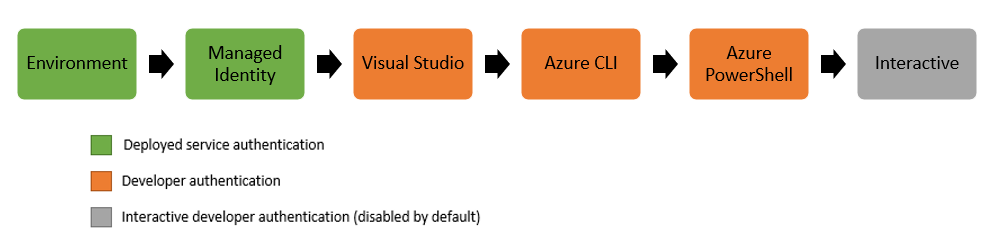
- Environment - The
DefaultAzureCredentialwill read account information specified via environment variables and use it to authenticate. - Managed Identity - If the application is deployed to an Azure host with Managed Identity enabled, the
DefaultAzureCredentialwill authenticate with that account. - Visual Studio - If the developer has authenticated via Visual Studio, the
DefaultAzureCredentialwill authenticate with that account. - Visual Studio Code - If the developer has authenticated via the Visual Studio Code Azure Account plugin, the
DefaultAzureCredentialwill authenticate with that account. - Azure CLI - If the developer has authenticated an account via the Azure CLI
az logincommand, theDefaultAzureCredentialwill authenticate with that account. - Azure PowerShell - If the developer has authenticated an account via the Azure PowerShell
Connect-AzAccountcommand, theDefaultAzureCredentialwill authenticate with that account. - Interactive - If enabled the
DefaultAzureCredentialwill interactively authenticate the developer via the current system's default browser.
Examples
Authenticating with the DefaultAzureCredential
This example demonstrates authenticating the SecretClient from the Azure.Security.KeyVault.Secrets client library using the DefaultAzureCredential.
```C# Snippet:AuthenticatingWithDefaultAzureCredential // Create a secret client using the DefaultAzureCredential var client = new SecretClient(new Uri("https://myvault.vault.azure.net/"), new DefaultAzureCredential());
### Enabling the interactive authentication with the `DefaultAzureCredential`

Interactive authentication is disabled in the `DefaultAzureCredential` by default. This example demonstrates two ways of enabling the interactive authentication portion of the `DefaultAzureCredential`. When enabled the `DefaultAzureCredential` will fall back to interactively authenticating the developer via the system's default browser if when no other credentials are available. This example then authenticates an `EventHubProducerClient` from the [Azure.Messaging.EventHubs][eventhubs_client_library] client library using the `DefaultAzureCredential` with interactive authentication enabled.

```C# Snippet:EnableInteractiveAuthentication
// the includeInteractiveCredentials constructor parameter can be used to enable interactive authentication
var credential = new DefaultAzureCredential(includeInteractiveCredentials: true);

var eventHubClient = new EventHubProducerClient("myeventhub.eventhubs.windows.net", "myhubpath", credential);
Specifying a user assigned managed identity with the DefaultAzureCredential
Many Azure hosts allow the assignment of a user assigned managed identity. This example demonstrates configuring the DefaultAzureCredential to authenticate a user assigned identity when deployed to an azure host. It then authenticates a BlobClient from the Azure.Storage.Blobs client library with credential.
```C# Snippet:UserAssignedManagedIdentity // When deployed to an azure host, the default azure credential will authenticate the specified user assigned managed identity.
string userAssignedClientId = ""; var credential = new DefaultAzureCredential(new DefaultAzureCredentialOptions { ManagedIdentityClientId = userAssignedClientId });
var blobClient = new BlobClient(new Uri("https://myaccount.blob.core.windows.net/mycontainer/myblob"), credential);
In addition to configuring the `ManagedIdentityClientId` via code, it can also be set using the `AZURE_CLIENT_ID` environment variable. These two approaches are equivalent when using the `DefaultAzureCredential`.

### Define a custom authentication flow with the `ChainedTokenCredential`
While the `DefaultAzureCredential` is generally the quickest way to get started developing applications for Azure, more advanced users may want to customize the credentials considered when authenticating. The `ChainedTokenCredential` enables users to combine multiple credential instances to define a customized chain of credentials. This example demonstrates creating a `ChainedTokenCredential` which will attempt to authenticate using managed identity, and fall back to authenticating via the Azure CLI if managed identity is unavailable in the current environment. The credential is then used to authenticate an `EventHubProducerClient` from the [Azure.Messaging.EventHubs][eventhubs_client_library] client library.

```C# Snippet:CustomChainedTokenCredential
// Authenticate using managed identity if it is available; otherwise use the Azure CLI to authenticate.

var credential = new ChainedTokenCredential(new ManagedIdentityCredential(), new AzureCliCredential());

var eventHubProducerClient = new EventHubProducerClient("myeventhub.eventhubs.windows.net", "myhubpath", credential);
Managed Identity Support
The Managed identity authentication is supported via either the DefaultAzureCredential or the ManagedIdentityCredential directly for the following Azure Services:
- Azure Virtual Machines
- Azure App Service and Azure Functions
- Azure Kubernetes Service
- Azure Cloud Shell
- Azure Arc
- Azure Service Fabric
Credential Classes
Authenticating Azure Hosted Applications
|credential | usage
|-|-
|DefaultAzureCredential|provides a simplified authentication experience to quickly start developing applications run in the Azure cloud
|ChainedTokenCredential|allows users to define custom authentication flows composing multiple credentials
|ManagedIdentityCredential|authenticates the managed identity of an azure resource
|EnvironmentCredential|authenticates a service principal or user via credential information specified in environment variables
Authenticating Service Principals
|credential | usage
|-|-
|ClientSecretCredential|authenticates a service principal using a secret
|ClientCertificateCredential|authenticates a service principal using a certificate
Authenticating Users
|credential | usage
|-|-
|InteractiveBrowserCredential|interactively authenticates a user with the default system browser
|DeviceCodeCredential|interactively authenticates a user on devices with limited UI
|UsernamePasswordCredential|authenticates a user with a username and password
|AuthorizationCodeCredential|authenticate a user with a previously obtained authorization code
Authenticating via Development Tools
|credential | usage
|-|-
|AzureCliCredential|authenticate in a development environment with the Azure CLI
|AzurePowerShellCredential|authenticate in a development environment with the Azure PowerShell
|VisualStudioCredential|authenticate in a development environment with Visual Studio
|VisualStudioCodeCredential|authenticate in a development environment with Visual Studio Code
Note: All credential implementations in the Azure Identity library are threadsafe, and a single credential instance can be used by multiple service clients.
Environment Variables
DefaultAzureCredential and EnvironmentCredential can be configured with environment variables. Each type of authentication requires values for specific variables:
Service principal with secret
|variable name|value
|-|-
|AZURE_CLIENT_ID|id of an Azure Active Directory application
|AZURE_TENANT_ID|id of the application's Azure Active Directory tenant
|AZURE_CLIENT_SECRET|one of the application's client secrets
Service principal with certificate
|variable name|value
|-|-
|AZURE_CLIENT_ID|id of an Azure Active Directory application
|AZURE_TENANT_ID|id of the application's Azure Active Directory tenant
|AZURE_CLIENT_CERTIFICATE_PATH|path to a PEM-encoded certificate file including private key (without password protection)
|AZURE_CLIENT_SEND_CERTIFICATE_CHAIN|(optional) send certificate chain in x5c header to support subject name / issuer based authentication
Username and password
|variable name|value
|-|-
|AZURE_CLIENT_ID|id of an Azure Active Directory application
|AZURE_USERNAME|a username (usually an email address)
|AZURE_PASSWORD|that user's password
Configuration is attempted in the above order. For example, if values for a client secret and certificate are both present, the client secret will be used.
Troubleshooting
See the troubleshooting guide for details on how to diagnose various failure scenarios.
Error Handling
Errors arising from authentication can be raised on any service client method which makes a request to the service. This is because the first time the token is requested from the credential is on the first call to the service, and any subsequent calls might need to refresh the token. In order to distinguish these failures from failures in the service client Azure Identity classes raise the AuthenticationFailedException with details to the source of the error in the exception message as well as possibly the error message. Depending on the application these errors may or may not be recoverable.
using Azure.Identity;
using Azure.Security.KeyVault.Secrets;

// Create a secret client using the DefaultAzureCredential
var client = new SecretClient(new Uri("https://myvault.vault.azure.net/"), new DefaultAzureCredential());

try
{
    KeyVaultSecret secret = await client.GetSecretAsync("secret1");
}
catch (AuthenticationFailedException e)
{
    Console.WriteLine($"Authentication Failed. {e.Message}");
}
For more details on dealing with errors arising from failed requests to Azure Active Directory, or managed identity endpoints please refer to the Azure Active Directory documentation on authorization error codes.
Logging
The Azure Identity library provides the same logging capabilities as the rest of the Azure SDK.
The simplest way to see the logs to help debug authentication issues is to enable the console logging.
// Setup a listener to monitor logged events.
using AzureEventSourceListener listener = AzureEventSourceListener.CreateConsoleLogger();
All credentials can be configured with diagnostic options, in the same way as other clients in the SDK.
CAUTION: Requests and responses in the Azure Identity library contain sensitive information. Precaution must be taken to protect logs, when customizing the output, to avoid compromising account security.
DefaultAzureCredentialOptions options = new DefaultAzureCredentialOptions
{
    Diagnostics =
    {
        LoggedHeaderNames = { "x-ms-request-id" },
        LoggedQueryParameters = { "api-version" },
        IsLoggingContentEnabled = true
    }
};
When troubleshooting authentication issues, you may also want to enable logging of sensitive information. To enable this type of logging, set the IsLoggingContentEnabled property to true. To only log details about the account that was used to attempt authentication and authorization, set IsAccountIdentifierLoggingEnabled to true.
DefaultAzureCredentialOptions options = new DefaultAzureCredentialOptions
{
    Diagnostics =
    {
        LoggedHeaderNames = { "x-ms-request-id" },
        LoggedQueryParameters = { "api-version" },
        IsAccountIdentifierLoggingEnabled = true
    }
};
Thread safety
We guarantee that all credential instance methods are thread-safe and independent of each other (guideline). This ensures that the recommendation of reusing credential instances is always safe, even across threads.
Additional concepts
Client options | Accessing the response | Diagnostics | Mocking | Client lifetime
Next steps
Client libraries supporting authentication with Azure Identity
Many of the client libraries listed here support authenticating with TokenCredential and the Azure Identity library.
There you will also find links where you can learn more about their use, including additional documentation and samples.
Known Issues
This library does not currently support scenarios relating to the AAD B2C service.
Currently open issues for the Azure.Identity library can be found here.
Contributing
This project welcomes contributions and suggestions. Most contributions require you to agree to a Contributor License Agreement (CLA) declaring that you have the right to, and actually do, grant us the rights to use your contribution. For details, visit https://cla.microsoft.com.
When you submit a pull request, a CLA-bot will automatically determine whether you need to provide a CLA and decorate the PR appropriately (e.g., label, comment). Simply follow the instructions provided by the bot. You will only need to do this once across all repos using our CLA.
This project has adopted the Microsoft Open Source Code of Conduct. For more information see the Code of Conduct FAQ or contact opencode@microsoft.com with any additional questions or comments.